 |
Motion - Config Option Mask File |
|
You are here: Foswiki>Motion Web>MotionGuide>ConfigFileOptions>ConfigOptionMaskFile (10 Aug 2016, ChrisAAA)Edit Attach
mask_file
- Type: String
- Range / Valid values: Max 4095 characters
- Default: Not defined
- Group: Motion Detection
rotate option, note that the mask is applied after the rotation.
Detailed Description
The mask file must be a pgm format image file (portable gray map). Note that you must choose the BINARY (raw) format, and the code requires that the whitespace between the width and height values at the start of the file takes the form of a single space character. This is the line after the "P5". If yours doesn't, you may need to use a hex editor to modify it.
The feature is simple. Create an image of exact the same size as the ones you get from your video device (camera). Make a purely white picture and paint the areas that you want to mask out black. You can also make gray areas where you want to lower the sensitivity to motion. Normally you will stick to pure black and white.
One easy method for generating the mask file is as follows.
You can just take a motion captured picture, edit it with black and white for the mask and save it as a pgm file.
If you cannot save in this format save as a grayscale jpg and then you can convert it to pgm format with
djpeg -grayscale -pnm [inputfile] > mask.pgm
(assuming you have djpeg installed - part of the jpeg lib package).
Note that the mask file option masks off the detection of motion. The entire picture is still shown on the picture. This means that you cannot use the feature to mask off an area that you do not want people to see.
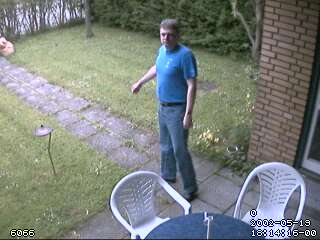
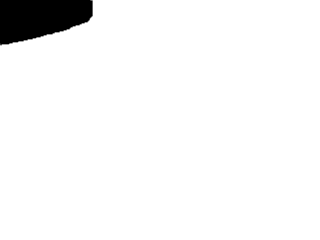
Below are an example of a webcam picture and a mask file to prevent the detection cars in the street.
Normal picture. Notice the street is visible through the hedge.
 Mask file (converted to png format so it can be shown by your web browser)
 |
Edit | Attach | Print version | History: r9 < r8 < r7 < r6 < r5 | Backlinks | View wiki text | Edit wiki text | More topic actions
Topic revision: r9 - 10 Aug 2016, ChrisAAA

 Application
Copyright © 1999-2026 by the contributing authors.
All material on this collaboration platform is the property of the contributing authors.
Please do not email Kenneth for support questions (read why). Use the Support Requests page or join the Mailing List.
This website only use harmless session cookies. See Cookie Policy for details. By using this website you accept the use of these cookies.
Please do not email Kenneth for support questions (read why). Use the Support Requests page or join the Mailing List.
This website only use harmless session cookies. See Cookie Policy for details. By using this website you accept the use of these cookies.